Bank Reconciliation reports
Bank Reconciliation Guide for Businesses in Puerto Rico
Bank reconciliation is a fundamental process to ensure the integrity and accuracy in the management of electronic payments for your business. In this section you will find clear information on the operating cycle, the types of reports available, the procedures for requesting them and the technological tools that facilitate their generation and analysis. This guide will help you understand how to verify your transactions, optimize your financial processes and comply with tax and audit requirements in Puerto Rico, taking full advantage of Placetopay and Evertec solutions.
Key Concepts
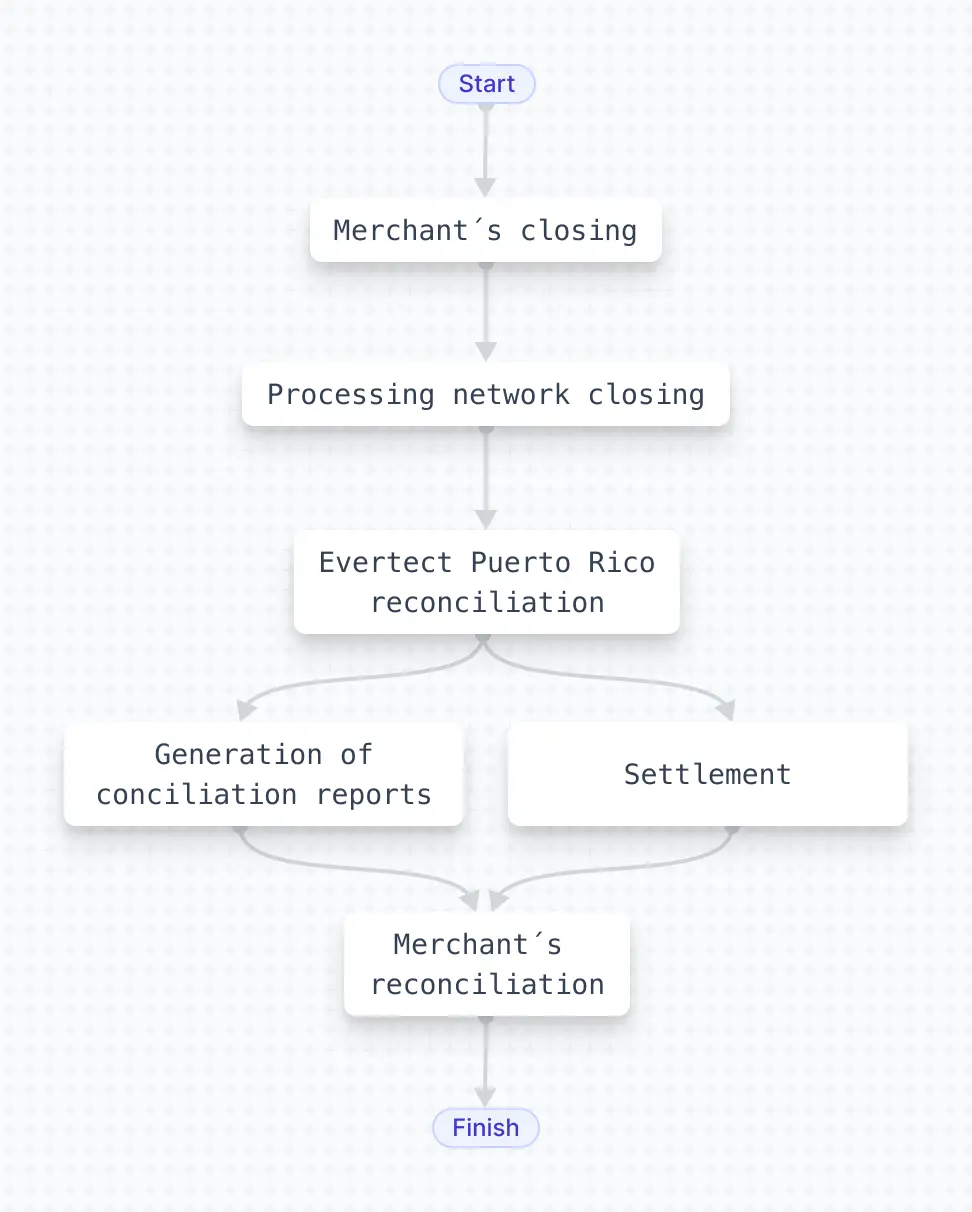
• Merchant’s Closing: The merchant’s closing finalizes the processing “batch,” grouping all transactions made during the day’s processing window. This allows to consolidate the transactions that will be reconciled and settled.
• Processing Network Closing: This step occurs on banking business days, typically at 3:00 PM (Puerto Rico time). There is no network closing on weekends or federal holidays, as banking operations are not conducted on those days.
• Internal Reconciliation: After the closing of the processing network, an internal reconciliation is carried out between the data from the processing network and the settlement. This step ensures that the processed amounts match the funds that will be transferred.
• Bank Conciliation: It is the process in which the funds from previously reconciled transactions are deposited. The deposit is made on the next business day.
• Conciliation Reports: Once the reconciliation and settlement are completed, final reports are generated, which include the reconciled payments (payment presentation)
These reports contain:
- Automated files (logfile.txt and lockbox.txt).
- Operational reports in PDF format.
- The reports are distributed via SFTP or through the Evertec Web Portal.
- They are also dynamically available on the Predictive Dashboard.
- Merchants use these reports to reconcile their transaction records, either automatically or manually.
Operational Cycle Flowchart
How to request bank conciliation reports for your business?
To request the bank reconciliation reports corresponding to your business, we recommend contacting your relationship officer directly. The acquiring bank to which you belong will be responsible for providing this information.
Merchant’s Closing
This is the moment when a merchant closes their sales day and performs a cutoff of the transactions processed during that period. It defines which transactions will be included in the day’s processing and reconciliation.
Processing Network Closing
Daily, as part of the transactional flow, the processing network performs a closing for the transactions made by the merchant. This closing takes place on business days of the banking exchange process, after 3:00 PM (Puerto Rico local time).
Internal Reconciliation
Once the processing network is closed, an internal reconciliation is carried out between the payment engine and the settlement.
This reconciliation is performed through an automated system by Evertec, which is responsible for verifying and validating that the transactions have been processed correctly according to the established records.
Settlement
The bank deposits are credited to the merchant’s account on the next business day following the processing of transactions and the closing of the processing network.
It is important to note that, in the case of American Express (AMEX), deposit timelines may vary depending on the terms and conditions previously negotiated between the customer and that entity.
Bank Conciliation Reports
At the end of the internal reconciliation process, reconciliation reports are generated in relation to the transactional equivalent to the bank deposit.
As part of this process, three reconciliation reports are generated for the merchant:
These files, produced because of the daily closing, are sent to the Evertec server Portal de Evertec and to the merchant’s preferred server via a secure file transfer protocol.
You can visualize an example of the types of reports in the following section Examples of reports
SFTP (Secure File Transfer Protocol)
It is a secure protocol for transferring files between computers over a network, using encryption via SSH (Secure Shell). It protects data during transmission, requires secure authentication, and allows operations such as uploading, downloading, renaming, or deleting files on remote servers.
Evertec Web Portal
It is an online platform designed for merchants to consult and manage key information about their electronic operations.
Required information to complete the form for SFTP configuration:
- Credentials
- User ID
- Password
- URL / IP
- Directory (Destination server)
- Transmission Security Option
- PGP Key (Yes o No) | Note: If Applicable
- SSH Key (Yes o No) | Note: If Applicable
Predictive
It is a Business Intelligence (BI) solution that enables visualization, analysis, and forecasting of key business information, including data extracted from PDF files such as bank statements.
How to request Predictive?
To make this request, you must contact your relationship officer, who will provide you with all the relevant details and the necessary guidance to complete the process.
How does the merchant perform its reconciliation?
Merchants have two options for carrying out their reconciliation processes: using automated tools or performing them manually.
In the case of automated solutions, merchants can develop their own programs or use existing systems that are compatible with the generation and reading of automated reports, such as logfile and lockbox files.
On the other hand, if the process is done manually, the merchant can use the operational report in PDF format to verify transactions one by one. Alternatively, if they have access to the Predictive tool, they can also use it to support this process.
Benefits of a Reconciliation Process:
• Verify transactions: Helps identify errors such as duplicate charges, unrecorded deposits, or transcription mistakes.
• Post payments to your customers: Validate successfully executed payments and update customer account balances.
• Match balances: Ensure that the bank balance matches the accounting balance.
• Prevent fraud: Helps detect unauthorized or suspicious transactions.
• Meet tax and audit requirements: Serves as evidence for internal or external audits and helps comply with tax regulations.
• Optimize financial management: With accurate and up-to-date financial data, you can plan payments, investments, and budgets more effectively.